Mastery: UML Part 2

Image from Ben Day

This is the second part of the UML posts. You can find the first part here. As you may have imagined, there are more types of diagrams in UML and I will write about some of them. it has not been easy to learn about it but I’ll do my best. I will discuss about state diagrams, package diagrams, component diagrams and GRASP (an extra topic).

The interesting thing when you are learning UML is that you need to understand some object oriented concepts. I had to remember the following:

Interfaces

It is when you force a class to have certain properties. In Object Oriented Programming,  it is a description of all functions that an object must have in order to be certain type of object. In languages like Java you need to specify which interfaces are suitable for an object but in some others like Go you don’t need to do that. The language checks if your structure contains the required methods and properties.

Association types

I see it each semester (more or less) and yet I have not learned it all. The reason is that I don’t usually create UML diagrams and that is something that I need to fix. The next image is great and it speaks by itself.

Image from artamonovdev from StackOverflow

Image from aioobe from StackOverflow

Diagrams again

State diagram

I like the video from below. Basically a state diagram is a deterministic finite automata. A state machine. If you have taken any course about Theory of Computation you know what I’m saying. You have states, events and transitions between them. They are very useful when you want to show the dynamic aspects of your system. There are a few steps to create one:

  • define the states
  • describe the states
  • draw the transitions
  • define the transition triggers
State diagrams

Package diagrams

They are used to simplify the simplicity of the ideas in your model. Basically you specify a hierarchy and separate the classes into groups. If you have seen a real software project you may have noticed the naming convention in the folders and the general structure… well, this is similar to a package diagram. You can include dependency arrows too. The following video explains it better.

Component diagrams

They are useful when you want to reuse pieces of code. Components are a bunch of classes that communicate using interfaces. You have required interfaces and provided interfaces. This is represented using arrows… Honestly I didn’t like this one and maybe I will not use it in soon.

GRASP

Finally, the extra topic: GRASP. This is a cool concept. It means «General Responsibility Assignment Software Principles». This is really useful when you want to write efficient and clean code. It consists of the following 9 principles that must be well defined in your project.

  • Creator
  • Information expert
  • Low coupling
  • Controller
  • High cohesion
  • Indirection
  • Polymorphism
  • Protected variations
  • Pure fabrication

I will not cover all of them but for example the Creator principle is that you ask the question «who instantiates that object?». And by answering all the 9 questions the result may be a good design for your system. You can check more about it in the following link.

References.

https://www.youtube.com/watch?v=-PYYRTlymPU

https://www.youtube.com/watch?v=-PYYRTlymPU

https://study.com/academy/lesson/grasp-design-patterns-in-object-oriented-design.html

Mastery: UML Part 1

Drawing UML
Image from Flickr

After a good time, here I am. And I will write about the Unified Modeling Language (aka UML). Maybe you have heard about it in your Software Engineering Foundation course but here it is again. As you may know, UML is a a general-purpose modeling language that is used in the development of software. It is intended to provide a standard way to visualize the design of a system.

For example you can explain how is the structure of your classes and how the user interact with your system. You have no limits! (*restrictions may apply.) If you already know Java or C++ then UML will be very useful. Basically, if you have experience with an object oriented language then UML will make your life easier as a software developer, and if you came from other programming language such as Go or Haskell then it won’t be easy.

In this first part I will write about three diagrams that are very common in UML: sequence diagrams, class diagrams and object diagrams.

Sequence diagrams

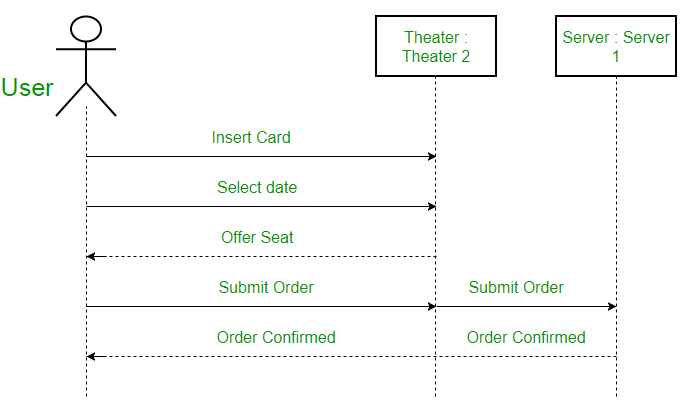
As in many UML diagrams, this type is useful to understand how the classes interact with each other, but not just that. Using these diagrams you can see the interactions in your system in the order they take place. Basically you have two components: actors and objects. Objects are represented using rectangles and may show the components o your system. On the other hand you have actors which are represented with stick figures and represent everything that interacts with your system but that is out of the scope of your project.

Image from Geeks4Geeks

You also have lifelines (those vertical lines that show the existence of a component over time as well as arrows to show the interactions between the elements. Summarizing, sequence diagrams are very useful when you want to show the requirements of your project.

Class Diagrams

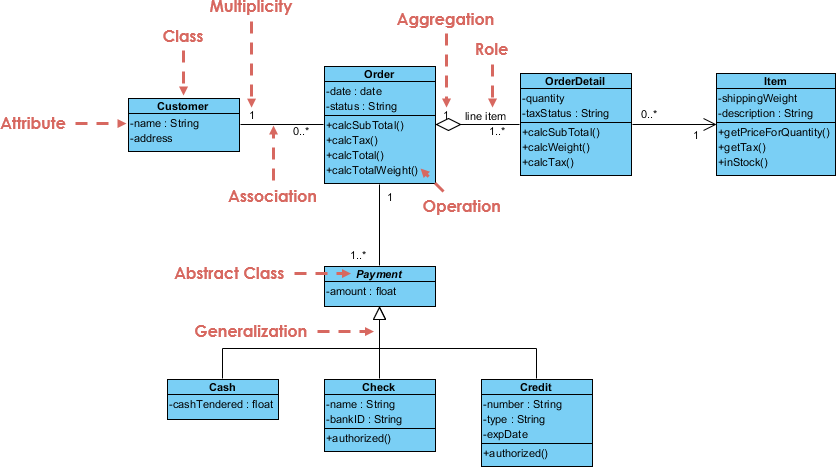
Maybe this is the more common type. You use class diagrams to explain your classes and the relationship between them in an object oriented way. Each class is represented using a box that is divided in three parts: the class name, attributes and methods. There are many elements that you may add using this class. For example, you can express association using a type of arrow or use a different type to express aggregration, composition, inheritance, etc. You can also express the multiplicity of the class relationships, the privacy in the methods, whether a class is abstract or no. Too much for a paragraph.

Image from Visyal Paradigm

Object Diagrams

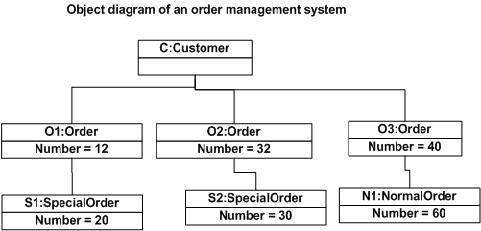
Last but not least: object diagrams. there are like class diagrams but they show the relationship between actual objects (i.e. class instances.) Here each rectangle has the name of the specific instance and the values of the attributes.

Image from Tutorials Point

Someone, maybe: «Karol, how did you learn so much about UML?»

Me: «YouTube»

Here you have some videos that were very useful to me:

Sequence diagram

Class diagram
Object diagram

References:

Visual Paradigm

Why I’m blogging

Blogging
Image from Flickr

Today I read about a life experience from a blogger called Ana. She is a frontend developer from London and when she was in college she liked to write on her blog about everything she was learning as well as other things. If you want to read the whole post, you can do it using this link.

Ana went through a stage in which she began to work as a junior developer and she felt as if she were not good in programming. When she was younger, she used to post every time and she did it for fun but then she thought that it was meaningless since she were not an expert and a lot of people may have posted a blog about the same topic.

In my personal experience, this is the first time I own a blog and it is hard to get accustomed to it… Sometimes we don’t know how to express what we have learned and we try to keep it secret in our head where we can understand it. Sometimes we think that we don’t know enough about the topic to write about it, especially if it is about a technical topic.

All of that is true, but what is also true is that being able to communicate your knowledge to other people is a superior ability and we should practice it to mastery.

At the same time, there are plenty of benefits about having a blog. Some of them are the following:

it helps you improve writing and argumentation skills

  • it helps you improve writing and argumentation skills
  • it helps you master the topic
  • it helps other people
  • puts your mind within everyone’s reach

If blogging is so great, why don’t I do it more often?

SimSE – A Game to Simulate Software Engineering Environment

The last few hours I was playing an educational videogame called SimSE which is about a fictional software engineering environment. You can choose the model: waterfall, prototype, XP, RUP, Inspection and Incremental.

I started with Waterfall but things didn’t get well:

Then I moved to XP just for fun:

I still need more practice with this. I will let you know if I do better.

Mastery 09 – Classes to Code

#golang
Image from Flickr. The Go Programming Language

I found that UML is used for the visual representation of objects, states and processes within a software or system and is mainly used in object-oriented software development. That means that if you want to move from the class diagrams to actual code it is kind of expected that you are working with an OO programming language.

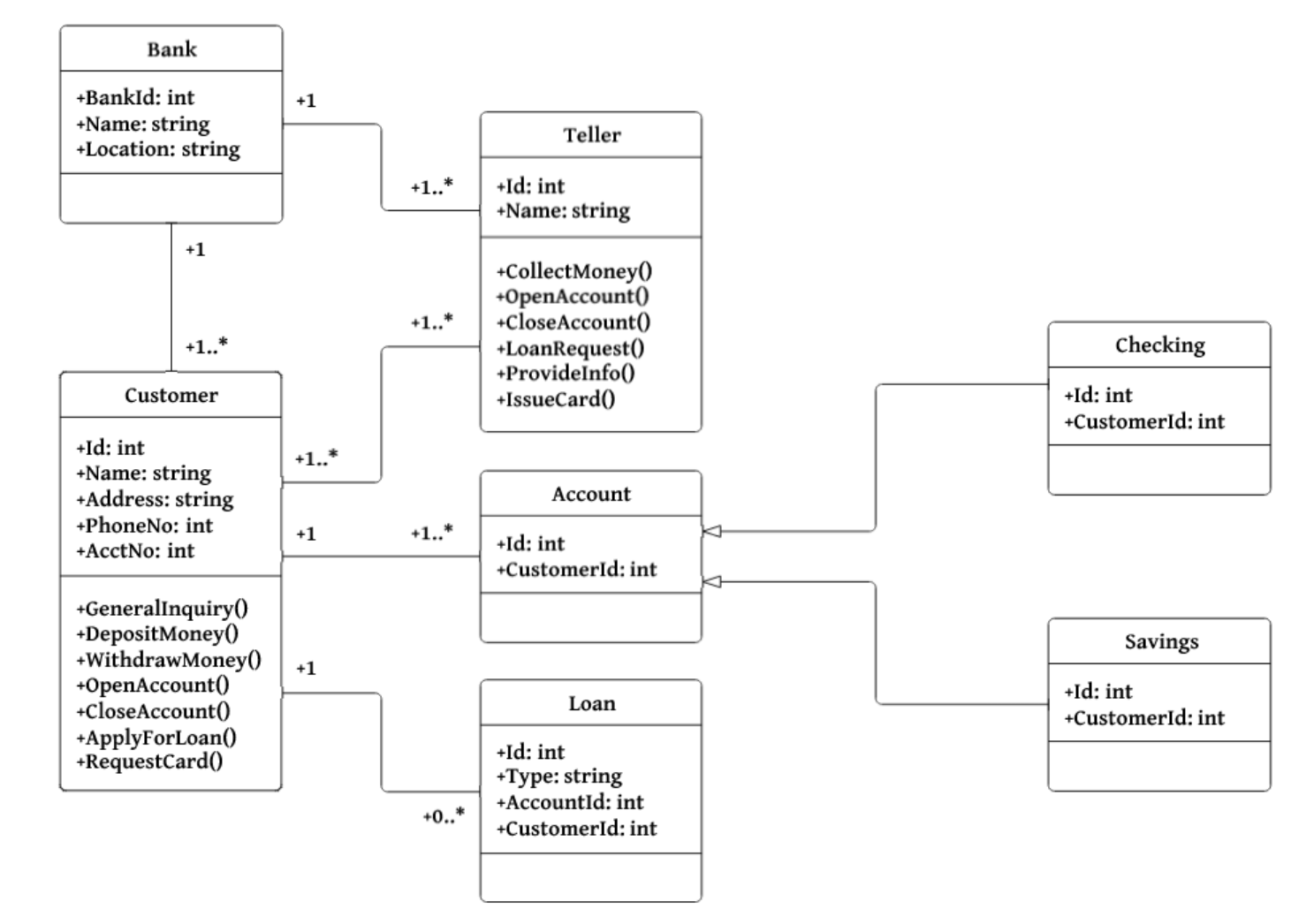
If you want to move from classes to code, then you usually start with a class UML diagram, such as the one that is below. Class diagrams are very useful when you want to represent the relationship between the objects in your system and in my opinion they are a communication mechanism rather than a kitchen recipe to write code.

Image from Salma from Medium.

Let’s look at some languages. Go, for example, is not an object oriented programming language but an interface oriented programming language. In Go you don’t have classes but you have types and interfaces. Technically you can build whatever you want using it but you need to make a different architecture and keep different things in mind.

I have seen many code implementations using Go. Actually, all design patterns that I know can be implemented in Go. Yet you cannot express class relationships as you would do in another language such as Java. At this point it is clear that you cannot directly move from classes to code, now the question is, is it UML problem or is it a Go problem?

I think that the problem is UML because it is outdated and the software development has move to different directions whereas UML remained in the same place for decades. Even some people say that «UML models in the field tend to be just pictures of Java classes. No surprise UML is not seen as a big benefit». I understand that the diagrams were a hit in the 90s but now you cannot simply move from a class diagram to a piece of code.

But nevertheless, class diagrams help to understand the problem by using them you only need to understand the implementation details to turn it into real code. Also, they are good representations of the state of the system and you can use your programming skills to adapt them to any programming language. As I said, UML diagrams can be a great tool of communication. But it’s best to keep them to this, and not try to use them for things they aren’t good in. If you are working with a common programming language (like Java) then the task is easy, but nowadays we have a lot of languages and every code generation task may become in a big deal in every language.

I found some videos about converting UML diagrams into Java code. You can think that maybe UML was designed thinking about Java:

References:

From Models to code with no mysterious gaps – interview with Leon Starr

About Chapter 7 – Bringing Order to Chaos

Image from Flickr

After all requirements are clear, after you have all your diagrams, the question that always come to mind is: «And what do I do first?». Maybe you have it all and yet you have no clue of what to do next. To solve this problem, the Chapter reads about it.

As the title says, I will write about «Bringing order to chaos». In the software field, a way to do it is by focusing on the architecture of your system. A software architecture provides a structure to the design of a software system, highlights the most important parts relationships between the parts of the system.

This process goes along with what we did in the previous chapters. All the diagrams and patterns were used to build exactly what the customer wants. And we began this path in the first chapter when we stated three principles (stages) in software development:

  1. Make sure your software does what the customer wants it to do.
  2. Apply basic OO principles and flexibility and
  3. Strive for a maintainable, reusable design.

If we are stuck and we don’t know what to code, we can prioritize the tasks that are required. You need to identify what is important in terms of architecture. A cool trick for this is to apply the Three Q’s Architecture:

  1. Is it part of essence of the system?
  2. What the heck does it mean?
  3. How the heck do I do it?

Regarding the first point, the essence of a system is what that system is at its most basic level. You need to look at all the requirements and identify those that are the essence. An easy test for this is to answer the question: «Can I imagine the system without it?». As you may expect, if you can’t image your system without a specific feature, then it is part of the essence of the system.

Regarding the second point, not having a clear idea of what you are required to do might indicate that the feature can take a lot of time to get right and you better start on it early. At this point you may ask the customer to make it clear.

Regarding the last point there are two strategies that are in the chapter: Commonality analysis and Implementation Plan. The first one is important because you need to identify what is common and what is varying in your system and then you need to work on that. After all, customers don’t pay for great code, they pay for great software.

The risk was another topic that was covered in the chapter. Everything you do in the architectural stages of a project should reduce the risk of the project failing. An important advice is to focus on one feature at a time to reduce risk in your project and don’t get distracted with features that don’t reduce risk

The following video explains what Software Architecture is. It does by focusing in the risk aspect that we are seeing in the chapter of the book and it explains it very well:

In conclusion, I found this chapter very important because it is common to get stuck in your project after you have the design and models, and the advices that were given here are like a punch to get the following tasks done.

References:

Head First Object-Oriented Analysis and Design: A Brain Friendly Guide to OOA&D. A McLaughlin, B, A Pollice, G, A West, D. 2007. O’Reilly Media, Incorporated.

From Classes to Tables

Image from Ntirety

Objects and tables have different purposes in programming. On one side, the objective approach is focused on building applications out of objects that have both data and behavior, and on the other side, the relational paradigm is focused on storing data. This means that it is not essentially easy to convert an object into a database table. You need a technique to proceed. If one technique is not enough to solve your problem you may need to move to the next approach, but at the end I will show that the problem may be harder than it looks.

For this post, we will be using Object Relational Mapping (ORM), which maps a data model to object model and viceversa. It is a technique for converting data between incompatible type systems using object-oriented programming languages. Some key aspects for this are the following:

Mapping attributes to columns. This approach is very naive, you just add a column for every attribute and set the correct data type. For this to work, every attribute only has one value (it is not a list of attributes)

Mapping classes to tables. Here is when things become difficult. The problem starts when you want to implement hierarchy and inheritance in the classes, You can use different approaches. One is to use one data entity for an entire class hierarchy. The advantage of this approach is that it is simple and that enables polymorphism in an easy way. The disadvantage is that every time a new attribute is added anywhere in the class hierarchy a new attribute must be added to the table, which can be annoying.

The second idea is to use one table per concrete class.The advantage of this is that you can create reports very easily because all the data is in a single table, but the disadvantages are that when you modify a class you need to modify the table and all the tables of the subclasses.

Finally the third idea is to use one data entity per class. As in the example in the image, where the primary key is used in all the entities. The main advantage of this is that it goes well with and OO notion: it supports polymorphism and it is easy to modify subclasses and superclasses. On the other hand, this has some disadvantages: it leads to having many tables and it takes longer to read and write data.

Image from IBM

Implementing many-to-many associations

For this case, you usually use a data entity (a table) whose sole purpose is to maintain the association between two or more tables in a relational database. It means that you use and extra table in which you can put two keys and the relationship that you want to show.

The next video talks about ORM and is very clear in the ideas behind the concept:

ORM in action

Using a relational database helps you with the mismatch between the object paradigm and the table paradigm. In a non-relational database the task becomes very difficult since there’s no standard in the data presentation. The main reason for this chaos is that you have different types of noSQL databases. You have Bigtable-like systems (HBase, Hypertable, etc), Key-value stores (Tokyo, Voldemort, etc), Document databases (CouchDB, MongoDB, etc) and Graph databases (AllegroGraph, Neo4j, Sesame, etc.) In the case of graph databases, there is an approach that helps you model the relationships but it is out of the scope of this post 😦 I found it here.

References:

Mapping objects to relational databases

Mapping Objects to Relational Databases: O/R Mapping In Detail

What is Object Relational Mapping (ORM)?

Graph Databases and the Future of Large-Scale Knowledge Management

8 Queens Problem using Smalltalk

[QueeN]
Photo from Flickr

Recently I built a program that solves the 8 Queens problem using an Object Oriented Approach with the programming language Smalltalk. You can consult the code in my Github account.

First, I had to learn how to use Pharo (which is a software where you can run Smalltalk programs) and it was not so easy. I followed this tutorial.Also, I found the next material called Learn Smalltalk with ProfStef and it was funny to learn.

The original article that brings me here is this, from Timothy Budd and it is part of his book. The interesting part about this paper is that it offer a new solution to the old 8 Queens problem. Instead of using a single data structure that controls everything, what the author does is to create instances of the Queen class that work together to find the general solution.

Smalltalk is a pure object-oriented programming language and when you start writing code in Smalltalk you need to have always in mind that you must take advantage of the power and flexibility of the objects.

In this case, we used the advantages of OOP by using a SentinelQueen class (the left-most queen) that behave almost like her sisters but with simplest methods. For example, a method called FindSolution that was present in the other queens, doesn’t need to be part of the sentinel instance because there’s no solution to continue finding if the queen is the last to be called.

The 8 queens problem has 92 solutions, but if we consider rotations and reflections, the number drops to 12. The program allows to modify the number of rows in the board to find the solutions on boards of different sizes (it starts to find solutions with a 5×5 board.)

During the next days I will add a graphic interface using Bloc to display the solutions in a fancy way. 🙂

About Modeling Languages and Tools

UML, image from Wikipedia

A software developer needs a way to describe a program. In those situations modeling languages are useful: to show interactions, design, usage, dependencies, limitations, and so on. Once you have an idea of what your program will do, you can figure out the structure of the classes and the diagrams involved such that anyone can understand it without thinking about a specific programming language.

A modeling language is a graphical or textual computer language that provisions the design of models of this kind.The most popular modeling language is UML (that stands for Unified Modeling Language) and we will talk about it during this post. Although there are some variants of the original language, we will focus on it in a general way.

The goal of a modeling language is to provide a standard way to visualize the design of a system. Something true about UML is that it is more closely associated to the Unified Process. «There are a number of methodologies that have UML as the preferred modelling language, such as Rational Unified Process or ROPES (Rapid Object-oriented Process for Embedded Systems)» (Lars, Hamza, 2016).

UML started in the 80’s and made possible to homogenize multiple older design practices in computer engineering. A common standard enabled computer scientists to develop more easily and precisely.

I do not think UML is on the decline in the industry. The knowledge and the practice of the language allows later accessing the advanced OO design tools (design patterns) & practices (S.O.L.I.D). (I hope that I will write about his in next posts.)

Some people may say that create diagrams using a modeling language is a waste of time but it is essential when you work in a team, and when you want to scale your project, a good diagram can help you choose the best design pattern or architecture and it can make a huge difference in the future.

An introduction to UML

References:

Modelling language

Has UML declined in the industry

Do prestigious software companies regularly use UML?

The Cathedral and the Bazaar

UNIX in Sydney, Australia
Photo from Flickr

This is the beginning of a cool story that shows the importance of the Open Source movement and how a community of users can create amazing things that can revolutionize the programming world. «The Cathedral and the Bazaar» is an essay about how a guy named Eric Steven Raymond developed a «fetchmail» system by using the bazaar development style. For those interested, here is a the original essay.

Although the text doesn’t focus on the technical side of the development, it shows the essential issues involved while making and maintain a system. As the essay states at the beginning, there are two main development styles: the cathedral and the bazaar. One is from the old school and the other one came to change the way software is developed.

A priori, a huge system must be developed in a centralized way, as in a cathedral, where everything is carefully crafted by one master mind. One may think that if we don’t have full control over the system then our system will broke easily. This kind of style is widely used in the industry, where all the code is kept secret and only a small team of engineers are responsible for fulfilling the requirements of the company. One possible benefit of this approach is that everything is well documented and we could track errors because everything is following a concise structure.

If Eric Raymond had followed that style, then the final result would not have been so good and this story would be very boring. The reason behind a new approach came from the Linux project. Raymond saw how a small operating system made with small pieces of code from other places became a huge and robust product that became popular all around the world. The Linux community seemed to work as a bazaar, a large shop with miscellaneous goods. New features added every day and new fixes every release.

This style of programming always start with a problem that is affecting a group of people. All of them have the same desire of solve the problem and the only way to do it is by working together. This is the part when the Open Source concept takes significance, because everyone can take the code and make changes to improve it or create completely new products for the benefit of the community.

I recognized some cool ideas from the text. One of the most important is the fact that open source developers don’t work for money but for recognition and satisfaction. I think that the open source became so popular because people simply like that things work this way, they want a free world where every user is valuable and taking into account, where someone can take initiative and become the next Linus Torvalds.

If you decide to read the full essay, I’m sure that you will notice the 19 important points that the author learnt through his journey in the software development process of an open source project and you can apply these ideas to your personal projects. I also recommend you this video about the open source movement.

References:

The Cathedral and the Bazaar

Open Source Initiative